

RotoHound
Sign UpRTSports Fantasy Baseball Draft Assistant
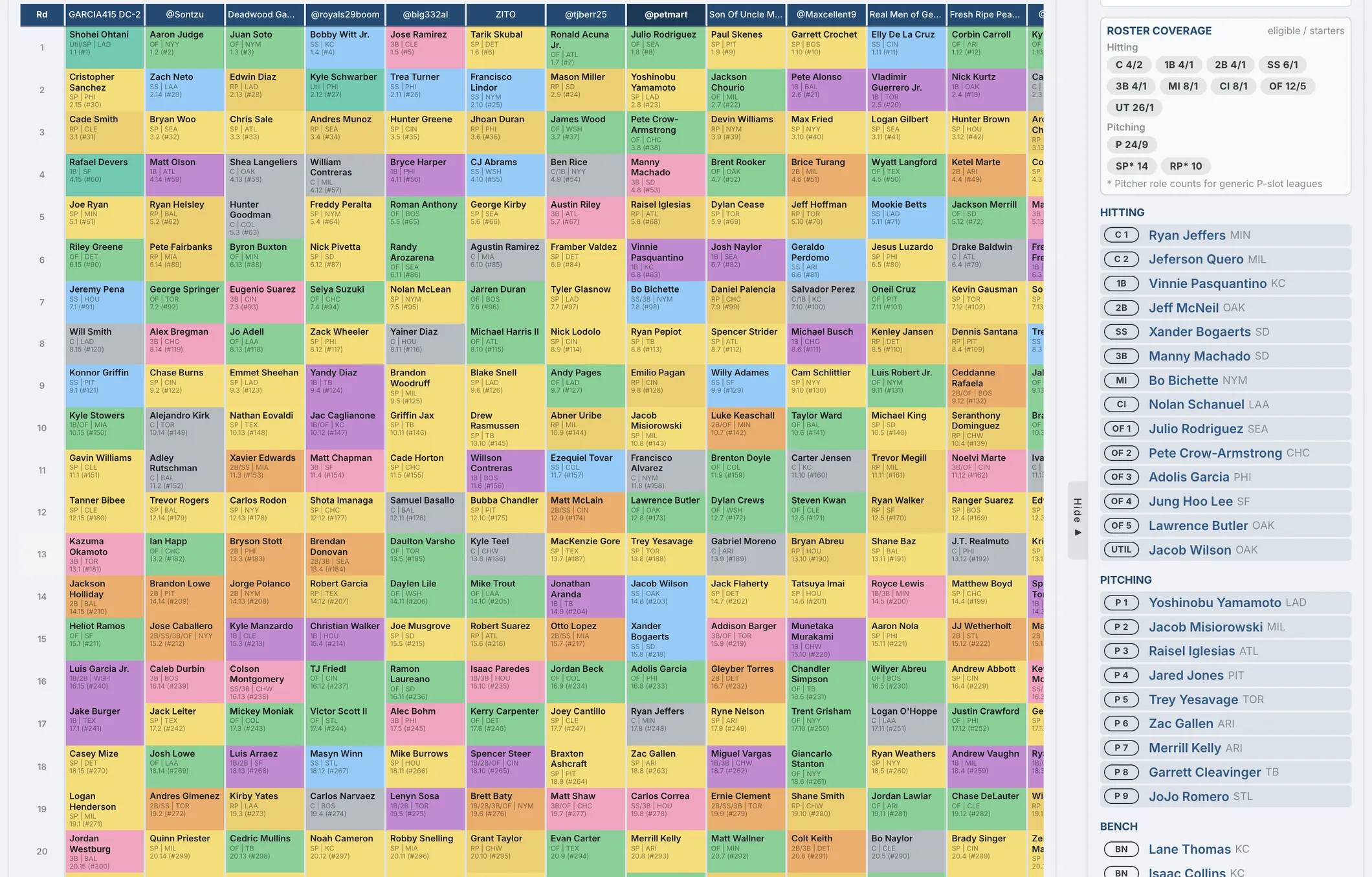
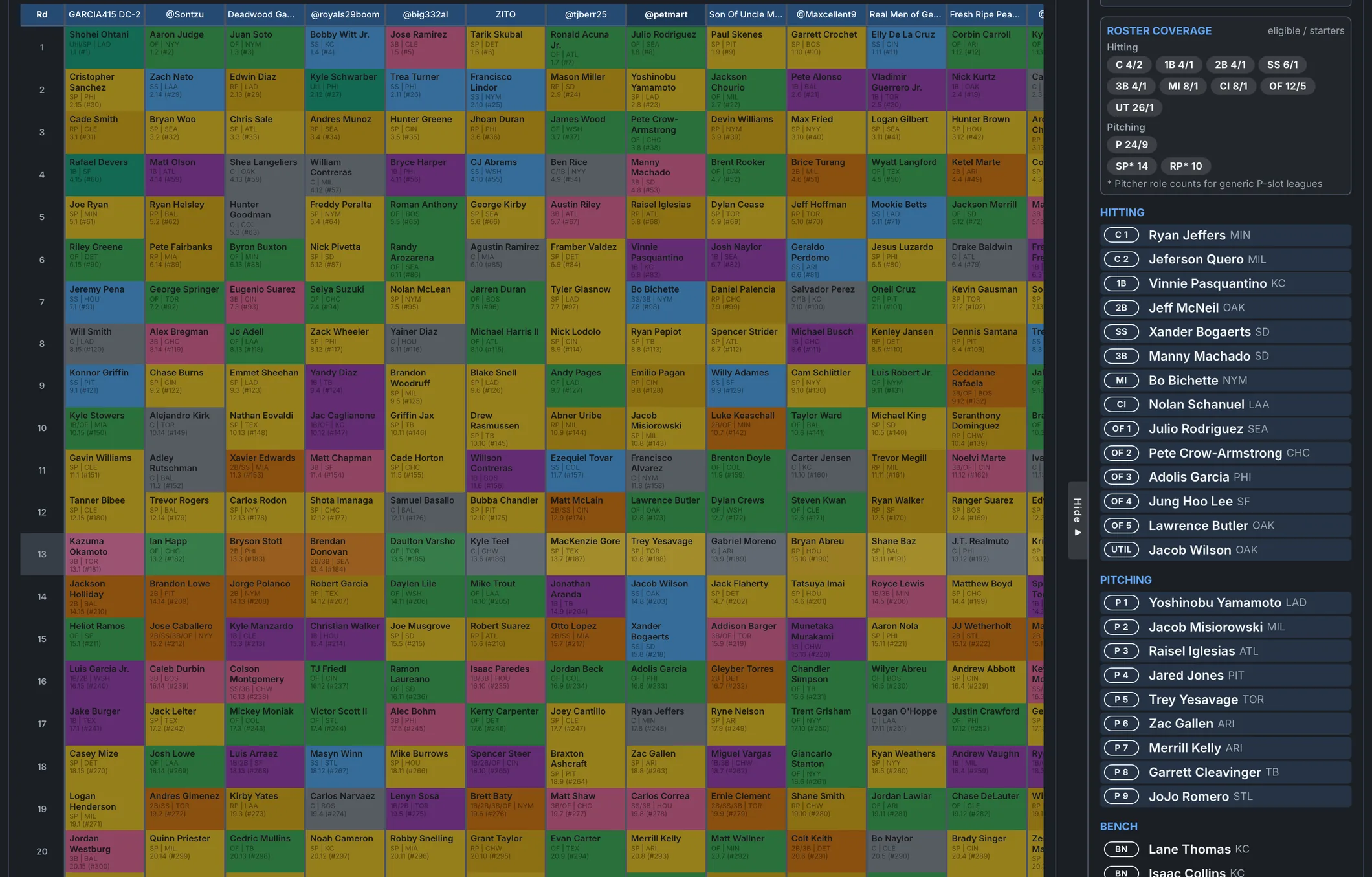
In development. A free draft board for RTSports leagues that opens without an account. Import the league before the draft, and every player carries a dollar value priced for its exact scoring and roster slots, with ADP beside it and the projected standings updating after every pick. Picks are recorded by hand; there is no RTSports draft-room sync yet.
Free for the 2026 season. Works with Yahoo, ESPN, CBS, Fantrax, Ottoneu, NFBC, OnRoto, RTSports, and Fleaflicker.
On another platform? Rosters, settings, and standings pull in automatically:
How the RTSports import works
RTSports shows league pages only to a signed-in session, so RotoHound imports from your own browser: the RotoHound Connector bookmarklet, clicked on your RTSports league page, or the RotoHound Chrome extension. Either captures the standings and every team’s roster page and hands them to RotoHound; nothing is sent to RTSports and nothing on the site changes. Refreshing during the season is the same click.
Values and ADP on one board
The player list shows every undrafted player with his dollar value for your league’s categories or point values, his projected stats, and his ADP, so a reach or a bargain is visible in one row. ADP is built in and refreshes daily from Yahoo, ESPN, and NFBC drafts: a league on one of those platforms sees its own platform’s ADP, and every other league sees a consensus of the three. Beside the ADP, two columns give each player’s chance of still being on the board at your next two picks, so a target that will survive to your next turn can wait and one that will not gets taken now. A vs ADP column shows how many picks later than his value rank the market takes him, and a tier column marks where the drop in value to the next player is large. Filter by position, search by name, and record a pick to any team with one click. Picks can be undone, and the board can be followed from a second device during the draft.
Projected standings after every pick
The Standings tab recalculates the projected standings for every team from the players drafted so far, in your league’s scoring format. While the draft is running you can see which categories your roster is building and which it is missing, and draft toward the gap instead of toward a generic ranking. An impact column on the player list shows how your projected standings would change if you took each available player with your next pick. The rest of the draft is filled in by ADP around each choice, so the number includes what the pick costs: the ADP default at your pick scores zero, a better use of it scores positive, and a reach scores negative.
Positional depth, keepers, and auction budgets
Positional depth charts list the remaining players at each position in order of value or ADP, so a drop-off at catcher or shortstop is visible before it arrives. The team panel beside the player list shows the roster grid, position coverage, and where the roster projects to finish in each category, with the rest of the draft filled in by ADP so the picture is complete from the first pick. Keepers come in with the league import and sit on their rosters before the first pick. In auction mode the board tracks every team’s spend, remaining budget, and open roster spots.
Mock drafts against the market
A mock draft fills the other teams’ picks for you. Each simulated team drafts by ADP, with the same spread the availability columns use, so a player with an ADP of 30 usually goes in the mid-20s to mid-30s and sometimes further either way, and a team with its catcher slot filled passes on the next one. After each of your picks the opponents draft to your next turn, or you can run the whole draft at once with your own picks made by value and read the projected standings at the end. Simulated picks show in italics on the Draft board and can be cleared with one click, or kept as real picks if the mock turns out to be the draft you wanted to record. It works in a snake draft, with or without an account.
What RotoHound reads from a RTSports league
The league’s rosters, scoring, and standings import from the captured pages. Scoring imports as configured, rotisserie or points, and values are computed for it. The expert leagues on RTSports, LABR among them, import the same way.
How it works
1. Import your RTSports league
Click the RotoHound Connector on your RTSports league page, or use the Chrome extension. Rosters and standings pull in from the captured pages.
2. Open the Draft Assistant
The board is built from your league’s rounds, teams, and draft order, with ADP for your platform beside the values and each player’s chance of lasting to your next two picks.
3. Draft
Record picks as they happen. Values, positional depth, and projected standings update with every pick.
Frequently asked questions
Does it sync picks from the RTSports draft room?
Not yet. Picks are recorded by hand as they happen and saved as you go, so the board can be open on a laptop while the RTSports draft room runs on another screen. Keepers and rosters import automatically before the draft.
Why does the RTSports import need a bookmarklet or an extension?
RTSports redirects every league page to its login unless the request comes from a signed-in session. The bookmarklet and the extension run inside your signed-in tab, so they can read what you can, and they pass only the league pages to RotoHound.
How are the draft values calculated?
The same way as Player Values: category leagues use standings gain points, points leagues use points above replacement, and both are scaled to your league’s budget, roster sizes, and number of teams. A catcher, a closer, or a steals specialist is priced for your format, not a generic one. The methodology page covers the details. Read the methodology
Does it support auction drafts and keeper leagues?
Yes. Auction mode tracks each team’s spend and remaining budget against the salary cap. Keeper leagues import their keepers with the league, and the projected standings count them from the first pick.
Where does ADP come from?
RotoHound refreshes ADP daily from Yahoo, ESPN, and NFBC drafts. A Yahoo, ESPN, or NFBC league sees its own platform’s ADP, and every other league sees a consensus, the average of each player’s draft rank across the three. You can also upload an ADP export from NFBC or any other source and set it as the default for a league.
Is RotoHound free?
Yes. RotoHound is free for the 2026 season with a free account.
Import your league
Free for the 2026 season. The Draft Assistant opens with your league loaded as soon as the import finishes.
Draft Assistant for other platforms
More RotoHound tools
© 2026 RotoHound. All rights reserved. · Trade Analyzer · Draft Assistant · Pickup Analyzer · Projected Standings · Player Values · Lineup Planner · Features · How It Works · Methodology · FAQ · Glossary · 2026 Rankings · Players A-Z · Testimonials · Terms · Privacy · support@rotohound.com
Yahoo, ESPN, CBS, Fantrax, Ottoneu, OnRoto, NFBC, RTSports, and Fleaflicker are trademarks of their respective owners. RotoHound is not affiliated with or endorsed by these platforms.